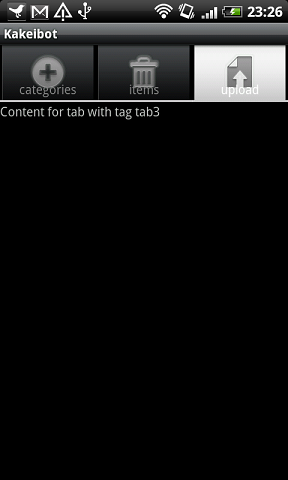
Android TabActivity を利用するサンプル
TabActivity を利用するためのスケルトン。
package info.typea.kakeibot;

import android.app.TabActivity;
import android.content.Intent;
import android.os.Bundle;
import android.view.LayoutInflater;
import android.view.View;
import android.widget.TabHost;
import android.widget.TextView;

public class KakeibotActivity extends TabActivity  implements TabHost.TabContentFactory{

    /** Called when the activity is first created. */
    @Override
    public void onCreate(Bundle savedInstanceState) {
        super.onCreate(savedInstanceState);

        final TabHost tabhost = getTabHost();

	// アクティビティ(CategoryPickupActivity) をタブにホストする
        tabhost.addTab(tabhost.newTabSpec("tab1")
                .setIndicator("categories", getResources().getDrawable(android.R.drawable.ic_menu_add))
                .setContent(new Intent(this, CategoryPickupActivity.class)
                .setFlags(Intent.FLAG_ACTIVITY_CLEAR_TOP)));

        // アクティビティ(RegisterdItemPickupActivity)をタブにホストする
        tabhost.addTab(tabhost.newTabSpec("tab2")
                .setIndicator("items", getResources().getDrawable(android.R.drawable.ic_menu_delete))
                .setContent(new Intent(this, RegisterdItemPickupActivity.class)
                .setFlags(Intent.FLAG_ACTIVITY_CLEAR_TOP)));

	// このアクティビティ自体をホストする(createTabContent が返す View が表示される)
        tabhost.addTab(tabhost.newTabSpec("tab3")
                .setIndicator("upload", getResources().getDrawable(android.R.drawable.ic_menu_upload))
                .setContent(this));
    }

    @Override
    public View createTabContent(String tag) {
        final TextView tv = new TextView(this);
        tv.setText("Content for tab with tag " + tag);
        return tv;
    }
}