Flutter : Dialog


Xamarin –> Flutter の準備ができたので、
https://www.typea.info/blog/index.php/2019/10/03/xamarin_flutter
なれるために、基本的な機能を試してみる。
画面遷移 に続いて
Dialog
https://api.flutter.dev/flutter/material/Dialog-class.html
単純に、アラートダイアログを表示
import 'package:flutter/material.dart';

class SecondRoute extends StatelessWidget{

  Future<void> _handleHello(BuildContext context) async {
    return showDialog<void>(
      context: context,
      barrierDismissible: false,
      builder: (BuildContext context) {
        return AlertDialog(
          title: Text('Hello'),
          content: Column(

          ),
          actions: <Widget>[
            FlatButton(
              child: Text('OK'),
              onPressed: () {
                Navigator.of(context).pop();
              },
            ),
          ],
        );
      },
    );
  }

  @override
  Widget build(BuildContext context) {
    return Scaffold(
      appBar: AppBar(),
      body: Center(
        child: Column(
          children: <Widget>[
            Text(
              'Second Screen.',
            ),
            RaisedButton(
              onPressed: (){
                _handleHello(context);
              },
              child: Text('Hello'),
            ),
            RaisedButton(
              onPressed: () {
                Navigator.pop(context);
              },
              child: Text('Back'),
            ),
          ]
        ),
      ),
    );
  }
}
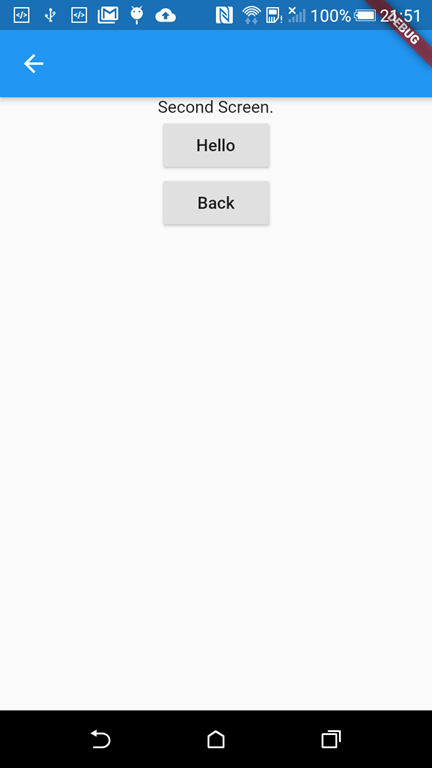
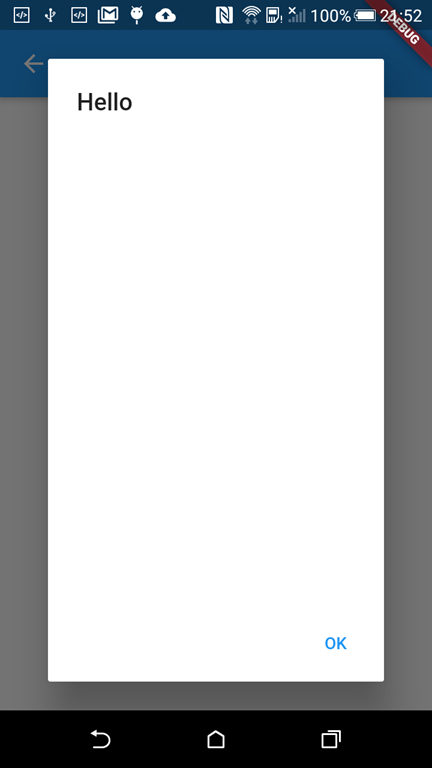
Hello ボタン押下でアラートダイアログを表示